The Ultimate Guide to Mastering Infinity Nikki's Outfit System in 2026
Infinity Nikki outfit saving guide empowers players to organize and rename their wardrobe for ultimate fashion creativity and efficiency.
Alright, fashionistas and digital dress-up divas, gather 'round! In the gloriously vibrant world of Infinity Nikki, half the fun is building a wardrobe that would make even the most seasoned stylist green with envy. We're talking hundreds—no, scratch that, in 2026 we're probably up to thousands—of dresses, hairstyles, socks, and accessories to collect. It's a sartorial paradise, but let's be real: with great fashion power comes great organizational responsibility. You can't just let all those killer combos live rent-free in your head; you gotta save 'em! Luckily, the game's got your back with a slick outfit-saving system that's smoother than Nikki's silk stockings. This guide is your one-way ticket from a fashionably cluttered closet to a curated, ready-to-rumble collection of looks.
Opening the Vault: Accessing Nikki's Wardrobe
First things first, you gotta get to the goods. To start your styling spree, you need to summon the trusty Pear-Pal. Think of it as Nikki's magical, fashion-forward smartphone. Once that bad boy is open, look for the 'Wardrobe' button chilling in the upper left corner. Give it a click, and voilà! You're in.
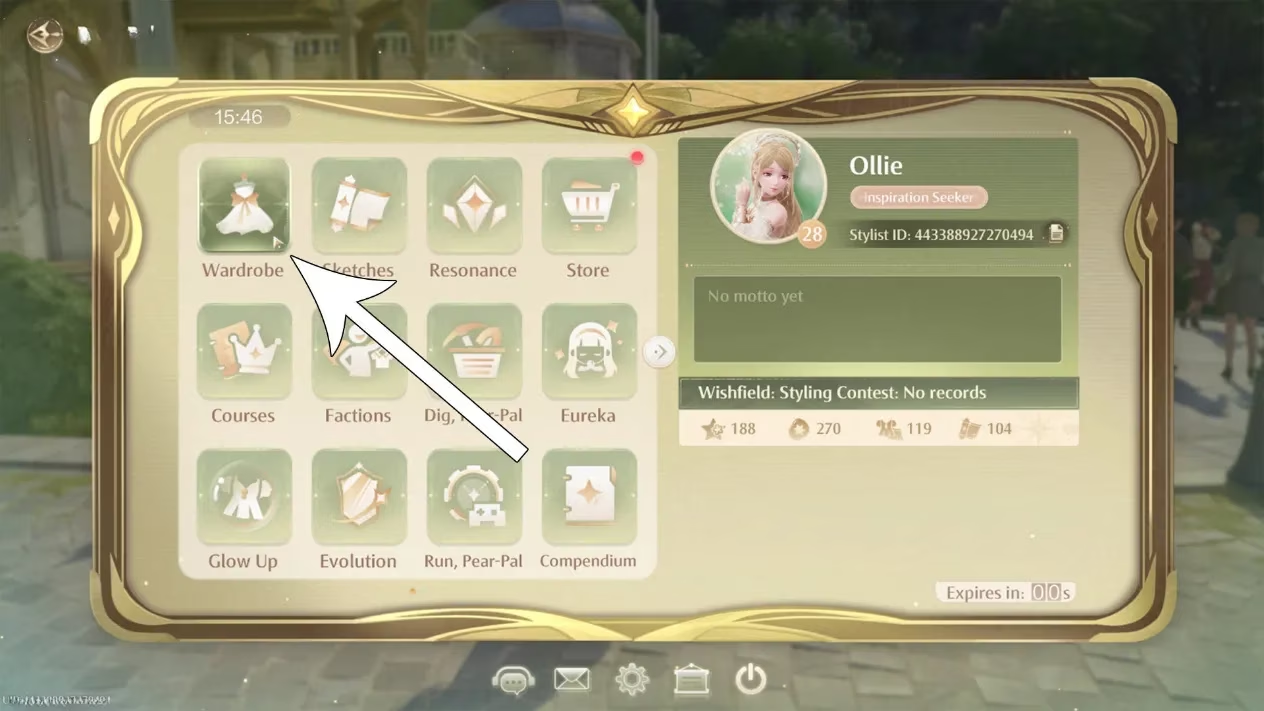
Inside, you'll find menus on the right listing every category of clothing you own. Go wild! Mix that elegant gown with some punk-rock boots. Pair a cute hairstyle with socks that have little ducks on them. The world is your oyster, and Nikki is your mannequin. Once you've crafted a masterpiece, you could just hit 'save' and call it a day. But where's the foresight in that? What if you want to rock this exact fit later after trying something else? You'd have to remember every single item—ain't nobody got time for that! That's where the real magic begins.
Saving Your Masterpieces: The Four-Slot Savior
Infinity Nikki, in its infinite wisdom (see what we did there?), provides you with four precious save slots for your outfits. That's right, four curated collections you can swap between faster than you can say "fashion emergency." Here's the step-by-step, no-sweat process:
-
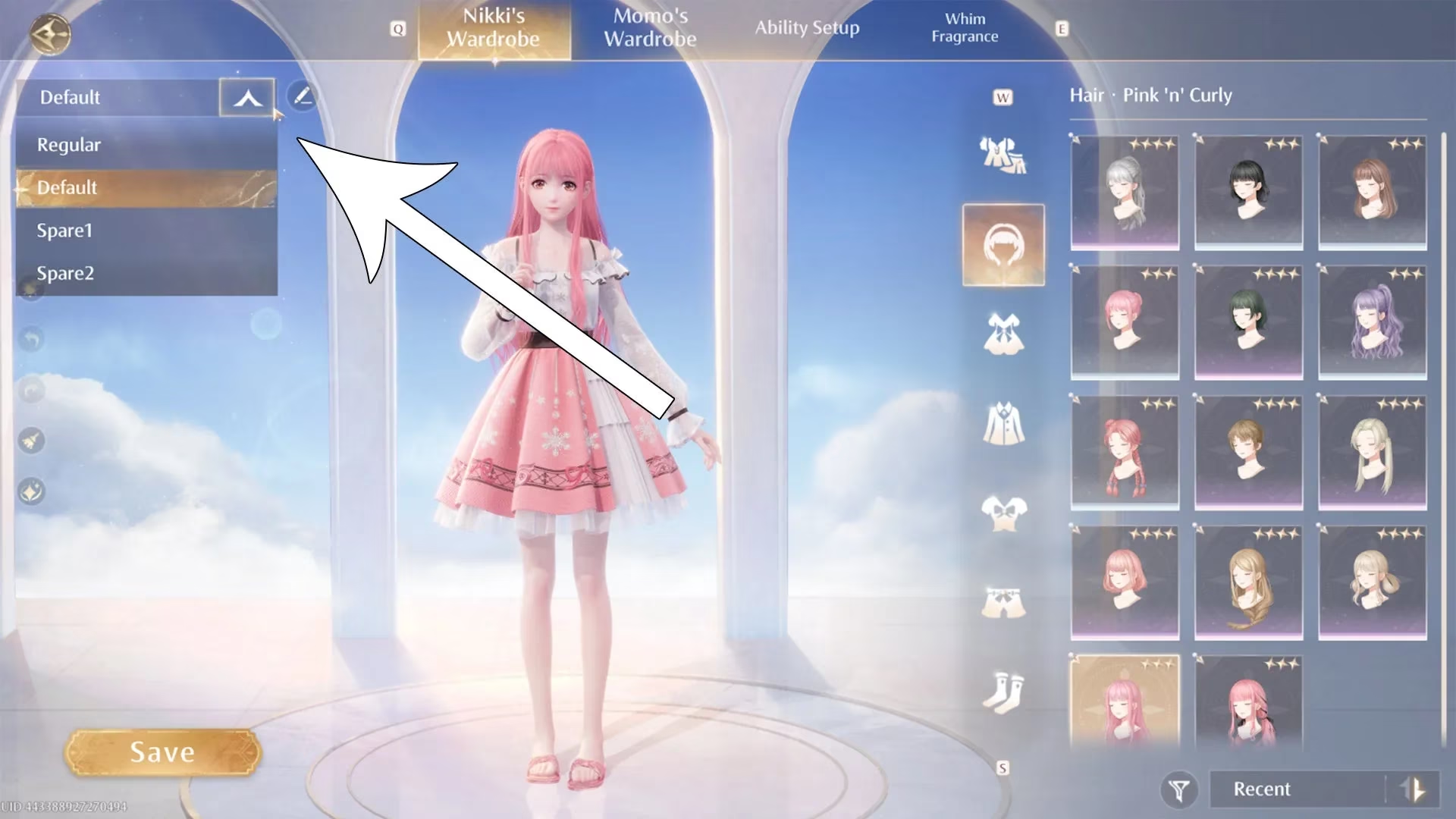
Locate the Drop-Down: In the Wardrobe screen, find the drop-down menu in the upper left corner. This little guy is your gateway to organized glamour.
-
Pick a Slot: Click the menu and select one of the four save slots. Maybe Slot 1 is for your "Battle Ready" looks, and Slot 2 is for "Casual Cuteness."
-
Craft & Save: Now, assemble your dream outfit. Once you're satisfied—every hair in place, every accessory perfectly positioned—hit that glorious 'Save' button.
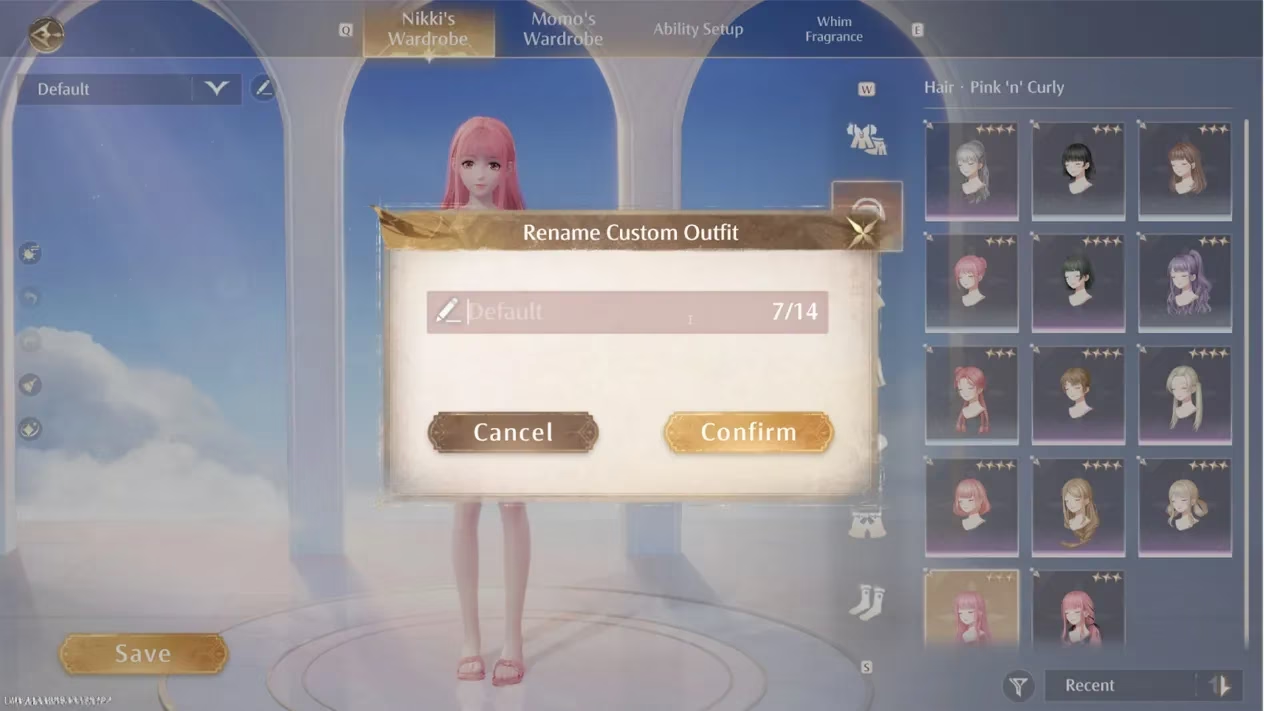
But wait, there's more! Are you the creative type who names their plants? Then you'll love this. You can rename your saved outfits! Just look for the tiny pencil icon next to your saved set's name. Click it, and let your imagination run wild. "Enchanted Forest Queen," "Cyberpunk Rebel," "Cozy Sunday Vibes"—the power is in your hands. This is a total game-changer for keeping track of which outfit is for stats and which is purely for slaying the competition in the looks department.
The Quick-Change Artist: Swapping Outfits on the Fly
Okay, so you've saved your top four fits. Now what? The real beauty of this system shines when you're out in the open world. Imagine this: you're exploring a sunny meadow in one outfit, but suddenly you need to dive into a spooky forest. Your cute sunday dress just won't cut it! Time for a quick change.
This is where you become a bona fide quick-change artist. Here's the 411:
-
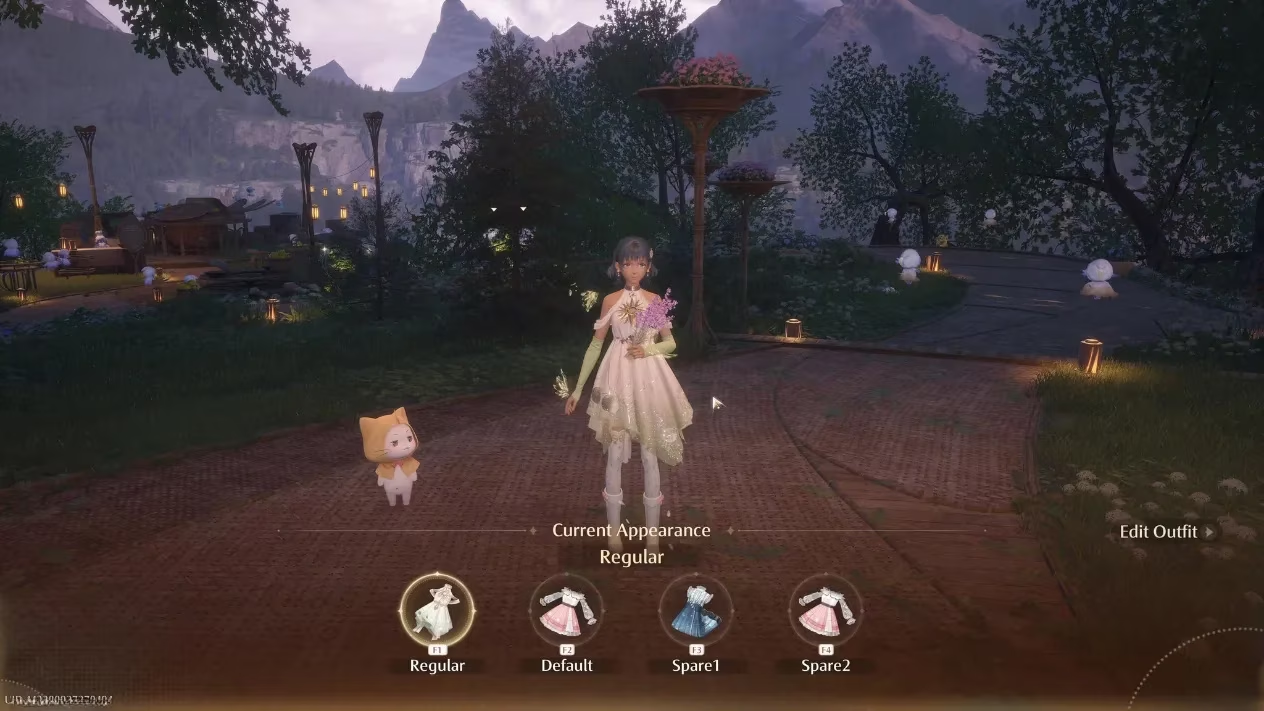
Hold down the
Xkey on your keyboard. This brings up a nifty quick-swap menu right there on your screen. -
Select your desired outfit. You can click on it with your mouse, or, for the ultimate power move, use the hotkeys
F1throughF4. Each key corresponds to one of your four saved slots. Talk about efficiency! -
Release the
Xkey. And just like that—poof!—Nikki's outfit transforms instantly. It's so smooth, it feels like magic (or really, really good programming).
Pro-Tips for the Fashion-Forward Player in 2026
Let's level up your game with some advanced strats. The meta is always evolving, and in 2026, being a top stylist means thinking strategically.
| Slot Number | Recommended Use | Naming Example |
|---|---|---|
| 1 | Max-Stats Combo | "BOSS SLAYER 9000" |
| 2 | Puzzle/Exploration Set | "Climb & Find Stuff" |
| 3 | Aesthetic Favorite | "My Magnum Opus 💖" |
| 4 | Wildcard / Theme Fit | "Underwater Ball" |
-
Stat-Savvy Saving: Don't just save pretty outfits! Always dedicate at least one slot to a combination that maximizes Nikki's key stats (like Agility, Perception, or Charm) for tackling tough challenges or specific puzzles. It's the difference between struggling and strutting to victory.
-
Seasonal Swaps: With regular updates and events, new clothing items are always dropping. Make it a habit to revisit your saved outfits every few weeks. Swap out older pieces for new, shinier ones to keep your top four looking fresh and functionally up-to-date.
-
Thematic Play: Use the naming feature! Seriously, it helps. Having outfits named "Desert Explorer," "Royal Gala," and "Rainy Day Core" makes choosing the right vibe for any in-game moment a total breeze.
So there you have it, folks! Mastering Infinity Nikki's outfit system is the ultimate QoL (Quality of Life) upgrade. No more frantically searching through your inventory mid-quest. With four saved outfits and instant swapping, you're always ready for whatever the whimsical world throws at you—be it a boss battle, a photo op, or just a sudden desire to look absolutely fabulous. Now go forth, collect, create, and save those fits! Your fashion legacy awaits. ✨